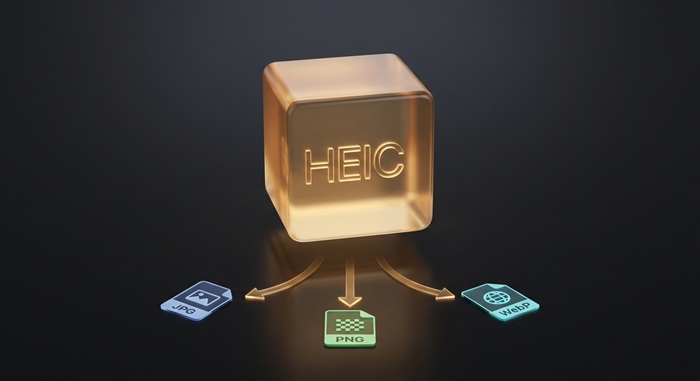
HEIC zu JPG stapelweise konvertieren
HEIC-Format in JPG-Format umwandeln
HEIC-Dateien oder Ordner hier ablegen
Klick zum Durchsuchen — unterstützt .heic, .heif, .hif
Tipps
HEIC — iPhone-Format. Halb so groß wie JPG, aber limitierte Unterstützung.
JPG — Universell. Öffnet sich auf jedem Gerät ohne Extra-Software.
Privatsphäre — Deine Dateien bleiben im Browser. Es gibt keinen Upload und keinen Serverzugriff.
Stapelverarbeitung — Du kannst auch einen ganzen Ordner ablegen. Einzelne Fehler stoppen die Warteschlange nicht.
HEIC in JPG umwandeln
HEIC-Dateien ablegen
Zieh Fotos von deinem iPhone oder Computer hierher, oder klick zum Durchsuchen. Wir nehmen mehrere Dateien auf einmal.
Sofort konvertieren
Das Tool arbeitet komplett in deinem Browser. Deine HEICs werden lokal verarbeitet, ohne Upload oder Server-Warteschlange.
JPG herunterladen
JPG herunterladen — universell auf jedem Gerät. Nutz den Qualitätsregler, um Größe und Qualität abzuwägen.
Über HEIC to JPG
HEIC ist Apples Standard-Fotoformat seit iOS 11. Es komprimiert Bilder auf halbe Dateigröße im Vergleich zu JPG bei gleicher Bildqualität. Der Nachteil: die meisten Windows-PCs, Android-Geräte, Webplattformen und ältere Apps können es nicht öffnen.
Dieses Tool wandelt HEIC-Dateien direkt in deinem Browser in JPG um. Deine Fotos bleiben auf dem Gerät; die Umwandlung findet lokal mit WebAssembly statt.
Die Ausgabe behält volle Auflösung und Farbgenauigkeit. Bei der Standardqualität von 90% ist der Unterschied zum Original mit bloßem Auge nicht erkennbar. JPG lässt sich auf jedem Gerät ohne Zusatzsoftware öffnen. Du musst dir keine Sorgen um versteckte Kompression, Wasserzeichen oder Limits machen.
Häufig gestellte Fragen
Was ist HEIC und warum muss ich es umwandeln?
HEIC ist Apples Standard-Fotoformat auf iPhone und iPad. Es spart Speicherplatz, wird aber von vielen Apps, Websites und älteren Geräten nicht unterstützt. Die Umwandlung in JPG macht deine Fotos universell kompatibel.
Was ist das JPG-Format?
JPG (oder JPEG) ist das am weitesten verbreitete Bildformat im Internet. Es nutzt verlustbehaftete Kompression, um Dateigrößen klein zu halten und dabei akzeptable Bildqualität für Fotos zu bewahren. Jedes Gerät, jeder Browser und jeder Bildeditor unterstützt es ohne Plugins oder Konvertierung.
Bleibt die Bildqualität erhalten?
Auflösung und Farbgenauigkeit bleiben vollständig erhalten. JPG ist ein verlustbehaftetes Format, also werden bei der Kompression einige Daten verworfen — so werden die Dateien kleiner. Bei der Standardqualität von 90% ist der Unterschied mit bloßem Auge nicht sichtbar. Du kannst den Regler nach unten ziehen, wenn du kleinere Dateien brauchst, aber unter 70% können sichtbare Artefakte auftreten.
Gibt es ein Dateigrößenlimit?
Es gibt kein hartes Limit. Da die Verarbeitung lokal in deinem Browser läuft, hängt das praktische Limit vom Arbeitsspeicher deines Geräts ab. Die meisten iPhone-HEICs lassen sich sofort konvertieren.
Muss ich mich anmelden oder bezahlen?
Nein. Du brauchst keinen Account, es gibt keine Wasserzeichen, kein Abo und keine "Upgrade für HD"-Falle. Alle Funktionen sind kostenlos und unbegrenzt.
Sind meine Fotos sicher?
Ja. Alle Konvertierungen laufen komplett in deinem Browser mit WebAssembly. Deine Fotos verlassen nie dein Gerät. Es gibt keinen Upload zu Servern und keine Protokollierung.
Mehr Blog-Posts zum Lesen
HEIC in JPG auf Android umwandeln (ohne App)
Anleitungen
Was ist HEIC? Ein technischer Deep Dive in Dateisignaturen, Erkennung und Konvertierung
Tiefenblick